vmlink-global
VMLINK supplies industrial rackmount desktop computers in 1U and 4U formats for automation, equipment control and system integration. Compare configurations by processor, memory, storage and expansion requirements to find a suitable starting point for your project. Share your rack dimensions, required interfaces, add-in cards and operating environment with our team to discuss model selection and available customization options.
VMLINK Industrial Rackmount PC Solutions
VMLINK industrial rackmount PCs are designed for applications that require reliable computing, organized rack installation and flexible hardware expansion. Available in compact 1U and expandable 4U configurations, our rackmount desktop computers can be configured for industrial automation, machine vision, data acquisition, surveillance, edge computing and other continuous-operation systems.
Configuration Best For Expansion Focus Typical Selection Logic
1U Rackmount PC Edge computing, network management, compact control cabinets Space efficiency and essential I/O Choose when rack space is limited and only moderate expansion is required.
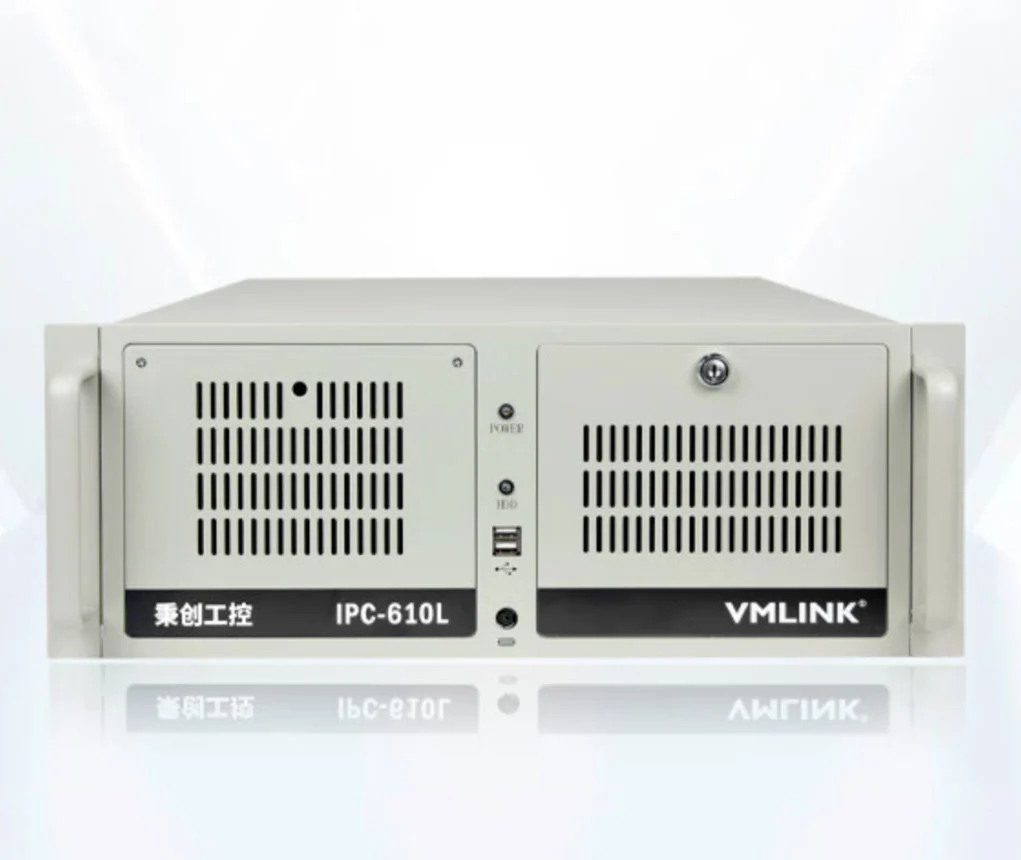
4U Rackmount PC Machine vision, industrial automation, data acquisition, GPU workloads PCIe cards, storage, graphics and cooling Choose when the system needs more add-in cards, drives or thermal capacity.
Custom Rackmount PC OEM machines, system integration and project-specific installations CPU, memory, storage, I/O, PCIe and chassis configuration Choose when a standard configuration cannot meet the required interfaces or expansion layout.
VMLINK industrial rackmount PC and rack mount computer
What Makes an Industrial Rack Mount Computer Different?
A rackmount desktop pc is built around a standardized rack installation format rather than a conventional desktop enclosure. For industrial projects, the advantage is not simply saving space. A properly selected industrial rack mount computer also makes it easier to organize multiple computing systems, expansion cards, storage devices and network connections inside control rooms, equipment cabinets and server racks.
The right chassis size should therefore be selected according to the actual hardware inside the system. A compact configuration may be suitable for network or edge workloads, while systems using multiple PCIe cards, graphics hardware or additional storage normally benefit from a larger chassis with more internal room for expansion and airflow.
1U vs 4U Rackmount PC: Which One Should You Choose?
The better choice depends less on processor performance and more on how much hardware must fit inside the chassis. Start with rack space, then check PCIe expansion, graphics, storage and cooling requirements.
Selection Factor 1U Rackmount PC 4U Rackmount PC
Rack Space Best when cabinet space is limited Requires more rack height
PCIe Expansion Suitable for lighter expansion requirements Better for multiple expansion cards
GPU Integration Depends heavily on chassis space and card dimensions More suitable for larger graphics cards and higher-performance systems
Storage Expansion Suitable for simpler SSD or limited-drive configurations Better when multiple drives are required
Cooling Space Compact airflow path requires careful component planning More internal space for airflow and higher-power components
Typical Use Edge computing, networking, compact industrial control Machine vision, automation, surveillance, data acquisition
Custom Rackmount PC Configuration Options
Industrial projects often require more than a standard PC specification. VMLINK can help match the rackmount computer configuration to the required computing workload, interfaces, expansion cards and installation environment.
Processor Platform
Select the CPU platform according to control, data-processing, vision or computing workload rather than choosing processor performance in isolation.
Memory & Storage
Configure memory capacity and SSD/HDD storage according to software requirements, data volume and long-term logging needs.
PCIe Expansion
Plan sufficient space and slots for frame grabbers, network cards, data acquisition cards, motion-control cards and other add-in hardware.
Industrial I/O
Select required LAN, USB, serial and other interfaces according to the equipment that will communicate with the rackmount PC.
Graphics & Vision
For machine vision, image processing or GPU workloads, chassis space, PCIe layout, graphics-card dimensions and thermal load should be evaluated together.
Power & Cooling
Power capacity and airflow should be matched to the installed processor, GPU, expansion cards and storage devices to support stable continuous operation.
Chassis Selection
Rack height and chassis depth should be checked against available cabinet space, internal components and maintenance requirements.
OEM Project Support
For equipment manufacturers and system integrators, configuration planning can be aligned with repeat project requirements and system integration needs.
Industrial Rackmount PC Applications
Rackmount industrial computers are particularly useful where computing systems must be installed centrally, connected to industrial equipment and maintained over a long service life.
01
Factory Automation
Use a rack mount embedded industrial pc as a central computing platform for production equipment, control software, SCADA, manufacturing data and equipment communication.
02
Machine Vision
Systems using cameras, frame grabbers, graphics cards or other PCIe hardware benefit from a chassis selected around slot count, card dimensions, processing load and cooling.
03
Data Acquisition
A rackmount computer can integrate DAQ cards, serial communication hardware, storage and network interfaces for continuous collection and processing of industrial data.
04
Security & Surveillance
Rackmount systems provide a practical platform for multi-channel video processing, networking and storage where the computer must be installed in a centralized equipment rack.
05
Industrial Edge Computing
Process machine and sensor data close to the production environment while retaining the organized installation and maintainability of a rack-based computing system.
06
OEM Equipment Integration
Equipment manufacturers can specify processor, storage, expansion and interface requirements around the needs of a repeatable machine or system design.
What Should You Check Before Buying a Rackmount PC?
Sending the following information with your enquiry helps avoid choosing a chassis that is too small, a power supply that is undersized or an expansion layout that cannot accommodate the required hardware.
Confirm the rack height, cabinet depth and installation space before choosing between a compact 1U and larger 4U chassis.
Tell us what software will run on the computer and whether the workload is control, vision, networking, data processing or another application.
Specify the number and dimensions of frame grabbers, graphics cards, network cards, DAQ cards or other expansion hardware.
List required LAN, USB, serial and other connections so that the motherboard and expansion configuration can be planned correctly.
Consider operating-system storage, application data, video or image files, database size and long-term data retention.
Share expected operating hours, ambient conditions and installation environment so that the system configuration can be evaluated as a complete solution.
Key Features of VMLINK Rackmount Computers
Standard Rack Integration
Designed for organized installation in rack-based computing and industrial control environments.
Flexible Hardware Configuration
Processor, memory, storage and expansion choices can be planned around the workload instead of forcing the application into a fixed desktop configuration.
Expansion for Industrial Hardware
Larger rackmount configurations provide space for PCIe cards and other hardware commonly required by industrial control, machine vision and data acquisition systems.
Serviceable System Architecture
Rack installation helps centralize computing hardware and makes system access, maintenance and future component replacement easier to plan.
Why Work with VMLINK for an Industrial Rackmount PC?
Application-Based Selection
Instead of selecting a chassis only by size, the configuration can be considered together with processing workload, interfaces, add-in cards and storage requirements.
1U & 4U Product Options
Choose a compact 1U rackmount PC for space-sensitive installations or move to a 4U platform when the application needs greater expansion flexibility.
Custom Configuration Support
For OEM and integration projects, hardware selection can be matched to the actual system instead of relying on a single fixed commercial PC configuration.
Need Help Choosing a Rackmount PC?
Send us your required CPU performance, memory, storage, PCIe cards, I/O interfaces, rack space and application environment. VMLINK can help you identify a suitable 1U, 4U or custom rackmount PC configuration for your project.
FAQs About Industrial Rackmount PCs
Quick answers to common questions from equipment manufacturers, system integrators and industrial computer buyers.
What is an industrial rackmount PC?
An industrial rackmount PC is a computer designed for installation in a rack-based cabinet or equipment system. Compared with a conventional desktop enclosure, it is better suited to centralized installation and can be selected with the expansion, storage and interfaces required by industrial automation, machine vision, data acquisition, surveillance and similar applications.
What is the difference between a 1U and 4U rackmount PC?
The main difference is chassis height and the internal space available for components. A 1U rackmount PC is compact and saves rack space, while a 4U rackmount PC provides more room for PCIe expansion cards, storage devices, larger graphics hardware and airflow. The best option depends on the hardware that must be installed inside the system.
How do I choose an industrial rack mount computer?
Start by identifying your rack space, processor workload, memory, storage, number of PCIe cards, required I/O interfaces and operating environment. These requirements determine whether a compact 1U system is sufficient or whether a larger 4U rackmount computer is more appropriate.
Can VMLINK customize a rackmount PC?
Yes. Rackmount PC configurations can be selected according to project requirements such as processor performance, memory, storage, expansion cards, I/O interfaces and chassis format. Providing the complete application and hardware requirements at the enquiry stage helps us recommend a more suitable configuration.
Can a rackmount PC support PCIe cards or a dedicated GPU?
Rackmount computers can be configured for PCIe expansion, but compatibility depends on the available slots, card dimensions, power requirements and chassis space. Applications using multiple add-in cards or larger graphics hardware are generally better suited to a chassis with greater internal expansion capacity.
Can rackmount PCs be used for machine vision?
Yes. Machine vision systems often require cameras, frame grabbers, network interfaces, graphics processing and high-speed storage. A rackmount industrial computer can provide a centralized platform for these components, especially when the chassis is selected around the required PCIe cards and processing workload.
Is a rackmount PC suitable for continuous industrial operation?
It can be, provided that the processor, power supply, cooling, storage and other components are selected for the actual workload and operating environment. For continuous-operation projects, VMLINK recommends sharing the expected workload and installation conditions when requesting a configuration.
What information should I provide when requesting a rackmount PC quotation?
Provide your preferred processor or performance level, memory, storage, operating software, PCIe cards, GPU requirements, LAN and serial interfaces, rack size, power requirements, application and expected operating environment. If you already have a hardware specification, you can send it directly for configuration review.